Stop Trusting Your Brain With Passwords — Here's Which Manager Actually Has Your Back
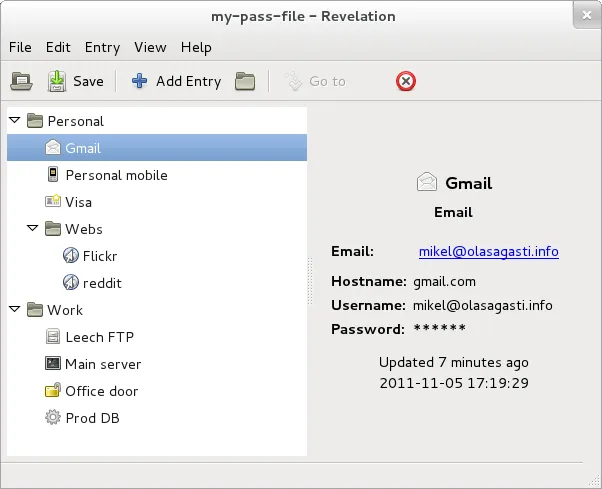
Photo: Kaxero, CC BY-SA 3.0, via Wikimedia Commons
Let's be honest: you're probably reusing passwords. Maybe you've got some variation of your dog's name plus a number that you've been cycling through since 2014. You're not alone — a 2023 survey from Google found that roughly 65% of Americans admit to reusing passwords across multiple accounts. And yet, every data breach that makes headlines is a direct consequence of exactly that habit.
Password managers are the obvious fix. But here's the thing — the market is crowded, the marketing language is thick, and it's genuinely hard to know which tool is doing the heavy lifting and which one is just selling you a pretty interface. We spent time pulling apart the most popular options out there: 1Password, Bitwarden, LastPass, and Dashlane. Here's the no-fluff breakdown.
What Actually Matters in a Password Manager
Before we get into the head-to-head stuff, it's worth understanding what you're actually evaluating. Most password managers will tell you they use "military-grade encryption," which is a phrase that means almost nothing without context. What you want to look for:
- Encryption standard: AES-256 is the current gold standard. All four tools we looked at use it.
- Zero-knowledge architecture: This means the company itself cannot read your vault. Your data is encrypted and decrypted locally on your device, not on their servers.
- Two-factor authentication (2FA) support: A good manager should support TOTP apps, hardware keys like YubiKey, and ideally biometric options.
- Breach history: Has the company been hacked? More importantly, how did they handle it?
- Open source or third-party audited: Transparency matters when you're trusting a tool with your entire digital identity.
1Password: The Premium Pick That Earns Its Price
1Password has built a reputation as the polished, professional option — and honestly, it deserves that reputation. The interface is clean, the browser extensions work reliably across Chrome, Firefox, Safari, and Edge, and the family and team plans are genuinely useful for sharing credentials without just texting someone a password in plain text.
Security-wise, 1Password uses AES-256 encryption with a zero-knowledge model, and they add a layer most competitors skip: a Secret Key. This is a 34-character code generated locally when you set up your account. Even if someone got your master password, they'd also need this key to access your vault. It's a meaningful extra barrier.
The downside? It'll cost you. Plans start at $2.99/month for individuals. There's no free tier — just a 14-day trial. If budget is a concern, that's a real friction point.
Bitwarden: The Open-Source Underdog Worth Taking Seriously
If 1Password is the premium sedan, Bitwarden is the surprisingly capable compact that costs a fraction of the price. It's fully open source, meaning anyone can audit the code — and security researchers regularly do. It's also passed multiple independent third-party audits, which adds a layer of credibility that proprietary tools can't easily match.
The free tier is legitimately functional. You get unlimited password storage, sync across unlimited devices, and basic 2FA support at zero cost. The $10/year premium tier unlocks advanced 2FA options, encrypted file storage, and a built-in TOTP authenticator.
The interface is a little less polished than 1Password, and some users find the initial setup slightly more involved. But if you're technically comfortable and care about transparency, Bitwarden is arguably the most trustworthy option on this list.
LastPass: A Cautionary Tale With Redemption Potential
We can't talk about password managers in 2024 without addressing the elephant in the room. LastPass suffered a serious breach in 2022 — attackers accessed encrypted vault data for millions of users. The encryption held up for strong master passwords, but users with weak or reused master passwords were potentially exposed.
LastPass has since overhauled its security infrastructure, increased its minimum password requirements, and brought in external auditors. The product itself still has a solid feature set: intuitive autofill, dark web monitoring, and a decent free tier (though they've restricted free-tier sync to one device type, which is a frustrating limitation).
The honest take: LastPass is not inherently unsafe today, but trust is hard to rebuild. If you're starting fresh, there are better options. If you're already deep in the LastPass ecosystem, make sure your master password is genuinely strong and enable every 2FA option available.
Dashlane: Feature-Rich but Pricey
Dashlane sits in a similar price bracket to 1Password but tries to differentiate with extras like a built-in VPN and real-time dark web monitoring. The core password management is solid — zero-knowledge architecture, AES-256, good browser integration.
The problem is value. The VPN is powered by Hotspot Shield and is more of a checkbox feature than something you'd rely on for serious privacy work. At $4.99/month, you're paying more than 1Password for features that feel a bit like filler. It's not a bad choice, but it's hard to recommend over the competition at that price point.
So Which One Should You Actually Use?
Here's the honest answer: it depends on what you value.
- Best overall security + usability: 1Password. The Secret Key model is genuinely clever, and the UX is the smoothest of the bunch.
- Best for transparency and budget: Bitwarden. Open source, audited, and practically free. Hard to beat.
- Best for families or teams: 1Password's shared vaults are intuitive and well-designed for group use.
- Avoid if starting fresh: LastPass. The breach history creates a trust deficit that's hard to shake.
The most important thing, though? Pick one and actually use it. A password manager you commit to — even an imperfect one — is infinitely better than a sticky note on your monitor or "Password1!" recycled across 40 accounts.
Your digital life is worth more than a weak password. Start treating it that way.